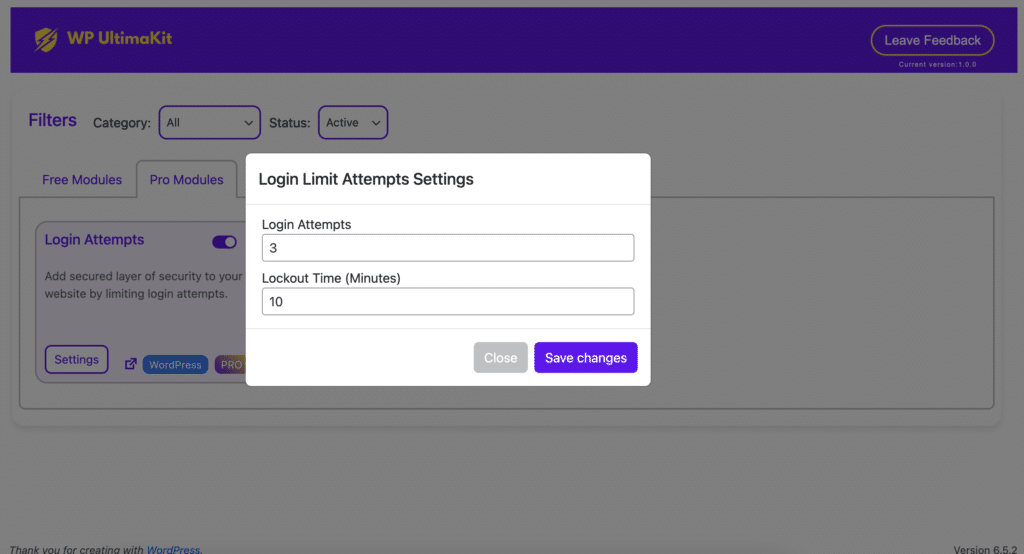
Login Attempts in WordPress
WordPress – Add secured layer of security to your website by limiting login attempts.
What are Login Attempts in WordPress?
- Every time someone tries to access your WordPress admin dashboard (the login page), it’s considered a login attempt.
- Successful login attempts are when the correct username and password are provided.
- Failed login attempts are when the incorrect credentials are used, or when someone tries to guess their way in.
Let’s activate the Login Attempts module:
Step 1 – Setup:
- Log in to your WordPress website.
- Make sure you have UltimaKit for WP Pro installed and activated.
- Go to the “WP UltimaKit” menu.
- Find the “Login Attempts” and turn it on.

Step 2 – Configure:
- Login Attempts: Configure a maximum number of failed login attempts to protect your site.
- Lockout Time(Minutes): After exceeding the limit of failed login attempts, users will be locked out for a specified time period.